
A Course can be created and saved in the ALE Application, including all attached content. Once created, these courses will be available to add to Written Student Learning Plans, and data from those plans will be surfaced in the Monthly Progress review.
The following table includes every available field when creating a course, along with whether they are displayed in the following locations:
Course/Class Details Modal: This info box appears when a user clicks the “i” next to a single Class in the Class Scheduling Interface. All users accessing the Class Schedule interface, including parents, can view this. The field from the Course record included in this view is indicated in this column.
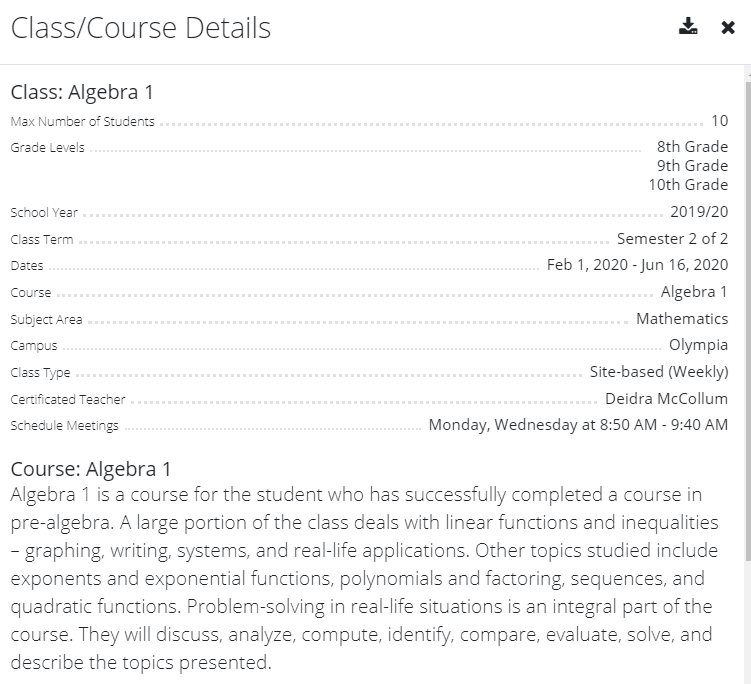
Subject/Course Record on the Student Learning Plan: Any field from the Course record that is included when that course is added to the Student Learning Plan is indicated in this column.
Monthly Progress Review: Any field from the Course record that surfaced on the Monthly Progress Review Interface is indicated in this column.
| Field Name | Display on Course/Class Details Modal | Copy Down to SLP for Individualization | Visible on Monthly Progress Review |
| Name | X | X | |
| Subdomain | |||
| Default Certificated Teacher | X | ||
| Description | |||
| District Approved Curricula | X | ||
| State Course Codes | X | ||
| SIS Course Codes | |||
| Grading | X | ||
| Grade Levels | X | ||
| Credit | X | X | |
| Prerequisites | X | ||
| Texts | X | ||
| Additional Resources | X | ||
| Instructional Materials Needed | X | X | |
| Essential Learnings | |||
| Average Hours Per Week | X | X | |
| Syllabus | |||
| Objectives | X | X | X |
| Objective Selections | X | X | |
| Standards | X | X | |
| Standard Selections | X | X | |
| Learning Requirements | X | X | |
| Academic Goals | X | X | X |
| Learning Activities | X | X | X |
| Learning Activity Selections | X | X | |
| Evaluation | X | X | X |
| Evaluation Selections | X | X | |
| Timelines | X | ||
| Monthly Timelines | X | X |
*One important thing to note is that when a printed Course Description is generated from the system, any available fields can be included. This format can be individualized for each program to meet your unique needs.
Comments
0 comments
Please sign in to leave a comment.